Gyms and climbing
Memberships that renew and gym lockers that pay you
VenueOra runs annual and monthly memberships, QR check-in at the desk and payments for gyms and climbing centres, and LockVault, our smart-locker service, puts lockers in on revenue share at no upfront cost. Every visit, payment and locker sits on one member record.
A day at your venue
What happens, in order
- 01
Join on a phone
A new member picks an annual or monthly plan on the gym’s site, pays by card, Apple Pay or Google Pay and gets a member account. They sign in later by password or by a magic link.
- 02
Scan in at the desk
Day passes and class tickets carry a QR code. Staff scan it on a phone, or the member checks in at a kiosk by member search with a second verification step. A code already used is rejected.
- 03
Open a locker by PIN
The member taps an NFC tag or enters a PIN on a LockVault locker. Staff assign a locker to a member, guest or ticket, release it or emergency-unlock it from the dashboard, and see usage analytics.
- 04
Buy a day pass
A walk-in buys a day pass at the kiosk or on a card terminal registered to the venue, by card, Apple Pay or Google Pay. The order is marked paid and the ticket issued on the spot.
- 05
Renew on time
Renewal reminders go out before the plan is due. The lifecycle manager emails members who are due, lapsed or worth winning back, and outstanding payments show in the member’s account with their state.
The stack
What the venue runs on
-
Annual and monthly plans
Plans priced by the gym, annual or monthly, with member balances and outstanding payments. Renewal reminders and a lifecycle manager for due, lapsed and win-back emails. Staff roles from Owner to Accountant control who sees payments.
-
Gym lockers on revenue share
LockVault, our smart-locker service, operates in gyms and sports clubs today and replaces coin and padlock lockers at no upfront cost. Lockers open by NFC tag or PIN, and the gym receives a share of gross rental revenue.
-
QR check-in at the desk
Day passes and class tickets carry a unique QR code. Staff scan at the desk or the member scans at a kiosk, and a code already used is rejected. Reception mode searches by member, guest, order or ticket.
-
04
PaymentsCard, Apple Pay and Google Pay
Online checkout and the kiosk take card, Apple Pay and Google Pay. Orders can be refunded, marked paid or taken on a terminal from the dashboard. Reports cover sales, VAT, year-on-year comparison and daily capacity.
-
Card terminals at reception
Card terminals are registered to the venue and take day passes and shop sales at the desk, with payment status polled back to the order. Card data never touches your tills, kiosks or lockers.
The dashboard
Every member, searchable in one list
The membership dashboard counts members, active subscriptions, new joiners and expiries, and lists every member with plan, type, joined and expiry dates, searchable by name, email or membership number.
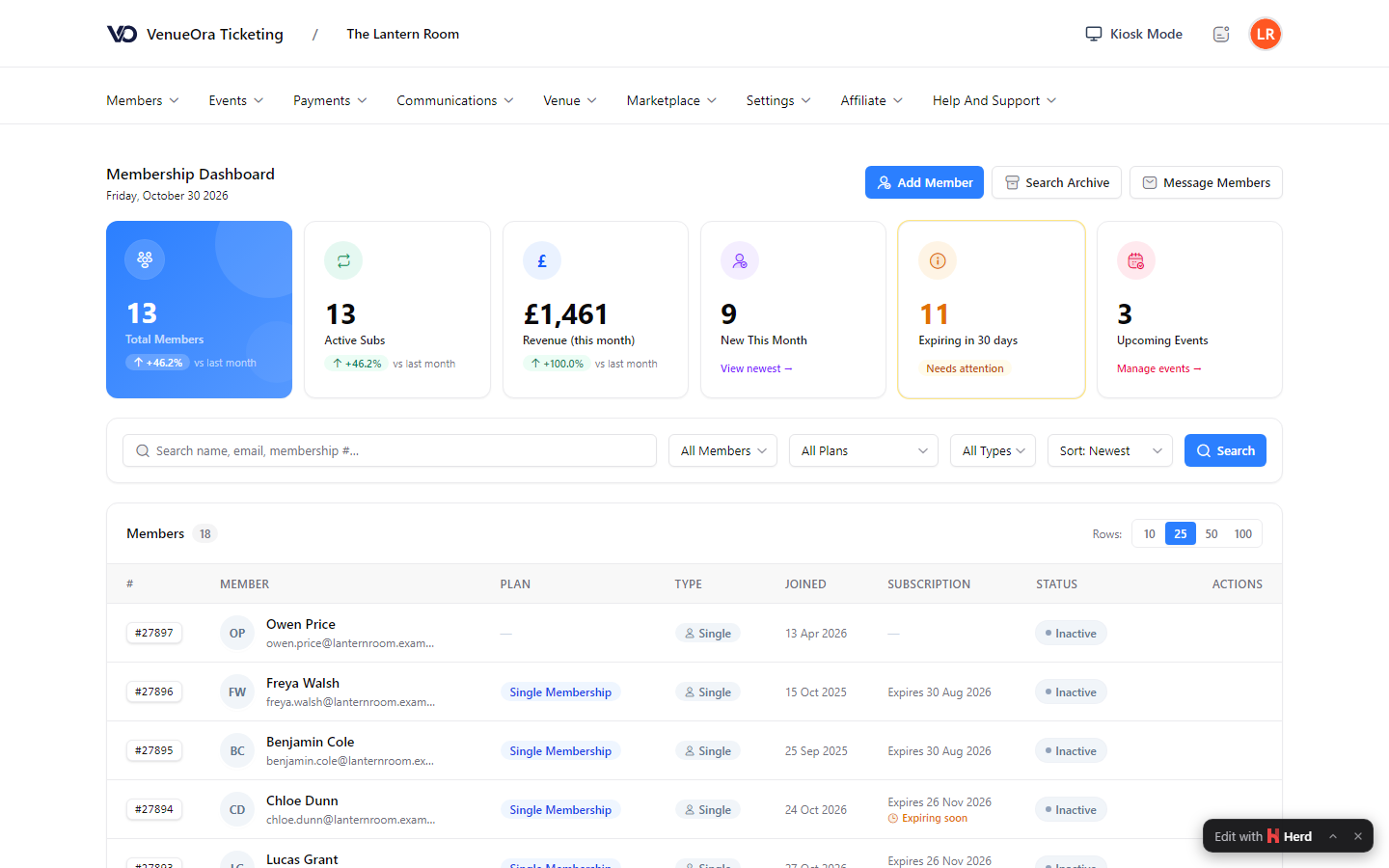
Screens show a live venue. Personal and venue details are blurred.
Outcomes
What changes for your venue
01
Renewals without chasing
Renewal reminders and lifecycle emails for due, lapsed and win-back members go out on schedule. Outstanding payments sit in the member’s account with their state, so the desk spends its time on the members in the building.
02
Lockers that earn, not cost
Coin lockers lose keys and padlock lockers lose padlocks. LockVault funds, installs, runs and maintains smart lockers and pays the gym a share of gross rental revenue, with an itemised statement on the 1st of each month.
03
One record per member
Plan, payments, tickets and locker assignments sit on one member record. Staff see who is due, who has lapsed and which lockers are out, and the member sees the same in their own account.
Why one platform
The plan, the door and the lockers on one record
Most gyms run memberships in one system, the door in another and the lockers on coins. VenueOra puts the plan, the check-in and the locker assignment on one record, and LockVault takes the lockers off your capital budget.
Member account and magic link
Members sign in by password or a magic link sent to their email, see outstanding payments, download tickets to Apple Wallet or Google Wallet and sign any policy still outstanding, such as an induction or a waiver.
No mains, no Wi-Fi needed
LockVault lockers carry their own power and connection, so most sites need no mains or Wi-Fi from the gym. LockVault handles support, refunds, maintenance, software updates and insurance, and monitors every bank 24/7.
Climbing centres too
Climbing walls sell day entry, class tickets and monthly plans to the same people. Ticket types can require a membership plan, so a members-only session or a competition sells only to approved members.
A share of every rental
The gym provides floor space and footfall. LockVault funds, installs, powers, connects, runs and maintains the lockers, sends an itemised statement on the 1st of each month and pays by the 15th.
- Upfront cost to the gym for LockVault lockers
- £0
- To hire a locker by tapping a card at the kiosk
- Under 30 seconds
- LockVault uptime service level
- 99.9%
FAQ
Questions venues ask
How do members renew their gym membership on VenueOra?
Plans are annual or monthly at the price the gym sets. Renewal reminders go out before the due date, and the lifecycle manager sends due, lapsed and win-back emails on the schedule you choose. The member sees outstanding payments in their account with a success, pending, failed or expired state and pays there. Staff see balances and outstanding payments on the member record, and an Accountant role covers payments, payouts, subscriptions and refunds.
What happens when a member’s card payment fails?
The payment shows as failed in the member’s account and on the dashboard, and the member is asked to pay the outstanding amount from their account. Lifecycle emails cover due and lapsed members, so a member whose card has expired hears from you rather than finding out at the door. VenueOra does not retry the card on its own; the member settles the outstanding balance and the plan continues.
How do gym lockers and memberships work together on VenueOra?
Staff assign a locker to a member, guest, ticket or event from the dashboard, and the member opens it with an NFC tag or a PIN, including a PIN emailed to a guest. Lockers can be released or emergency-unlocked remotely, marked out of service and reported on with usage analytics. LockVault, our smart-locker service, supplies and runs the locker hardware on revenue share, and it runs on VenueOra’s own locker management.
Do the smart lockers cost the gym anything?
No, there is no upfront cost and no operating cost to the gym. LockVault funds, installs, powers, connects, runs and maintains the lockers and handles support, refunds, maintenance, software updates and insurance. The gym provides floor space and footfall and receives a share of gross rental revenue, with an itemised statement on the 1st of each month and payout by the 15th. The split is agreed after a site survey, and a proposal follows within 48 hours of an enquiry.
Does VenueOra replace our door entry system?
No, VenueOra checks people in and does not supply turnstiles or door hardware. Staff scan a ticket’s QR code on a phone, or the member checks in at a VenueOra kiosk by member search with a second verification step, and reception mode shows the current session and who has arrived. Gyms and climbing centres with a staffed desk usually find that is all they need. If you already have turnstiles, ask us what connecting them would involve.
Can a climbing centre sell day passes and memberships from the same checkout?
Yes, day entry, class tickets and annual or monthly plans all sell from one checkout on the centre’s own site, by card, Apple Pay or Google Pay. A visitor who buys a day pass today and a monthly plan next month is one record, not two. Ticket types can be restricted to members or to a required plan, so a competition or a route-setting night sells only to the people it is meant for.
Related
Guide
Lockers as a service: what is included
Lockers as a service explained: what a no-upfront-cost locker deal should include, from hardware and payments to insurance, data, exit terms and ownership.
ReadGuide
Season pass and annual pass software explained
What pass management software for attractions must do beyond single bookings: renewals, failed-payment retries, family pricing, wallet passes and forecasts.
ReadSee VenueOra on your own venue
Tell us what your venue sells and we will walk you through the guest record, the gate and the till with your own numbers.