Ticket scanning
One scan at the door, and a used ticket is rejected
Ticket scanning on VenueOra is QR check-in at the door and on a kiosk, run by the platform that sold the ticket. A used ticket is rejected, reception mode finds anyone by member, guest, order or ticket, and RFID covers venues with wristbands.
Step by step
How it works
- 1
A unique QR code per ticket
Every ticket VenueOra sells carries a unique QR code, in the confirmation email, the downloadable ticket and the Apple Wallet or Google Wallet pass. Staff scan it from the phone screen or a printout.
- 2
Scan at the door or kiosk
Staff scan the code at the door in reception mode, or the guest scans it themselves on a self-serve kiosk. Either way the ticket is checked in against the event and a ticket already used is rejected.
- 3
Search when there is no code
Reception mode shows the current event and a guestlist search by member, guest, order or ticket. A guest without their phone is found and checked in by name, and added to the guestlist if they were never on it.
- 4
Log what happened at the door
Refuse entry or record an incident from the same screens, with member lookup, the people involved, the venue and the staff member on duty. The history is searchable, so the next shift knows what the last one saw.
What you get
Ticket scanning app for the door
QR check-in that reads the code from a phone screen or a printout and marks the ticket used against the event. The second time the same code is shown, it is rejected.
Self-check-in on a kiosk
The same QR scan runs on a self-serve kiosk, so guests check themselves in at a quiet door while staff work the main one. The kiosk also sells walk-in tickets and takes payment for the current event.
Reception mode with guestlist search
Reception mode shows the current event and lets staff find anyone by member, guest, order or ticket, then check them in. Guestlist analytics show who has arrived and who is still to come.
RFID scan and wristband pairing
Where the venue issues RFID wristbands, the kiosk scans them and pairs the wristband to the guest who checked in. That hardware is yours; VenueOra reads it alongside the QR code.
Face verification where you use it
Kiosks offer a member search with a second verification step, and face verification or enrolment where the venue runs that hardware. Neither is required; a venue on QR codes alone leaves them off.
Incident and refusal log
Record a refusal or an incident with member lookup, the people involved, the venue and the staff member, and search the history later, so the door team and the manager read the same record the next day.
The dashboard
The guestlist your door staff see
Every event carries a guestlist with search, due-to-arrive and checked-in filters and a check-in button on each row, with resend, export and check-in analytics on the same page.
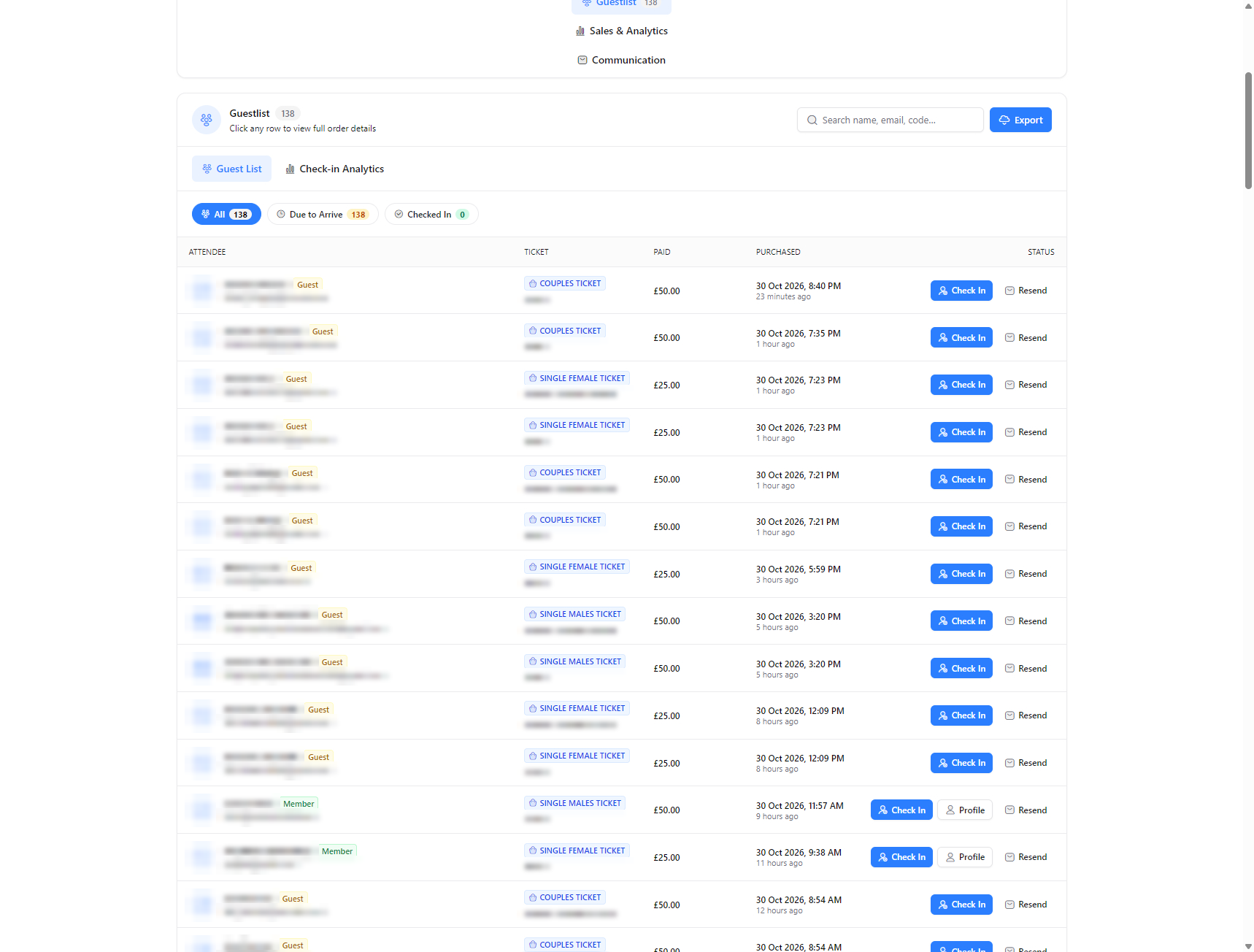
Screens show a live venue. Personal and venue details are blurred.
-
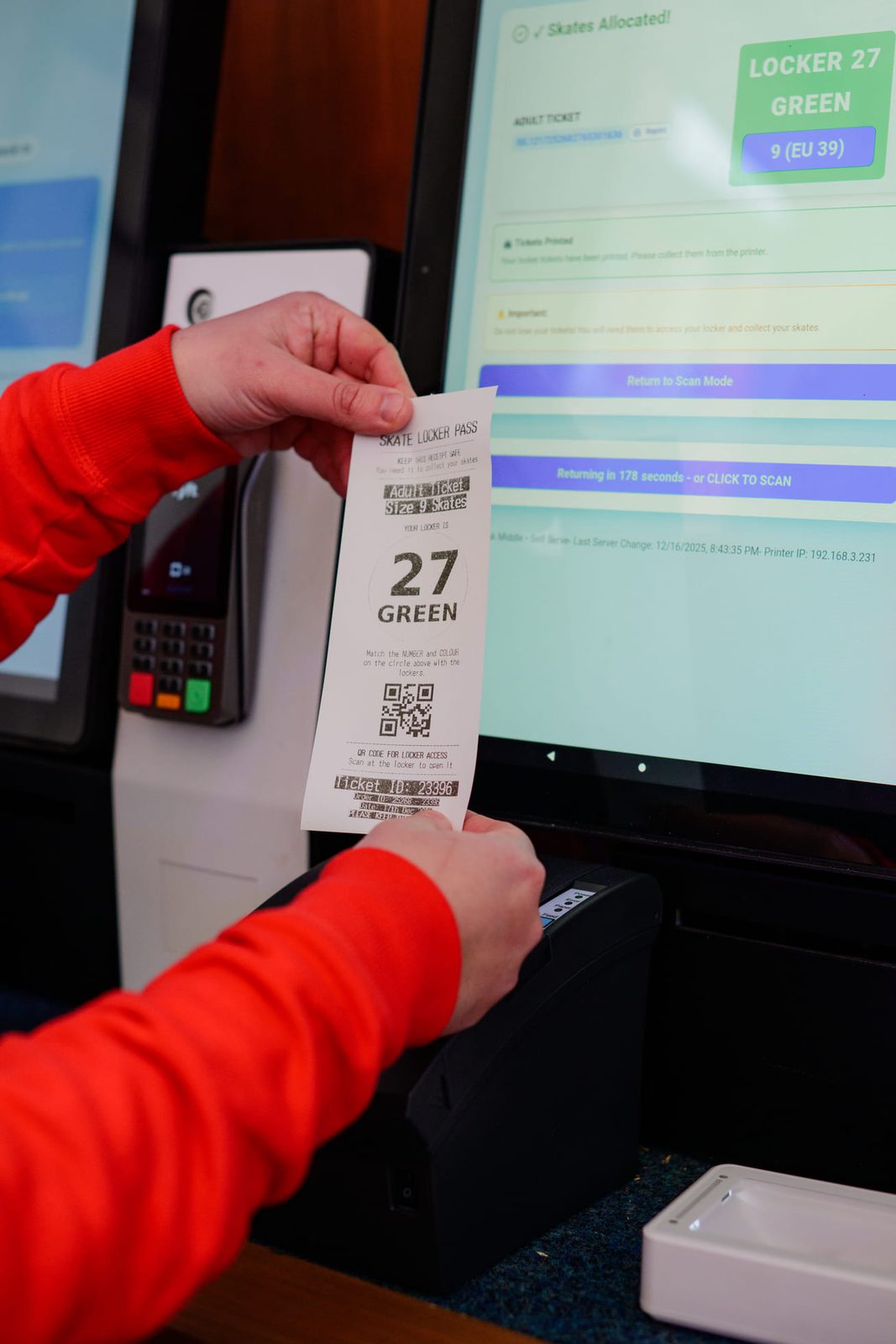
The kiosk prints a locker pass once the skates are allocated -
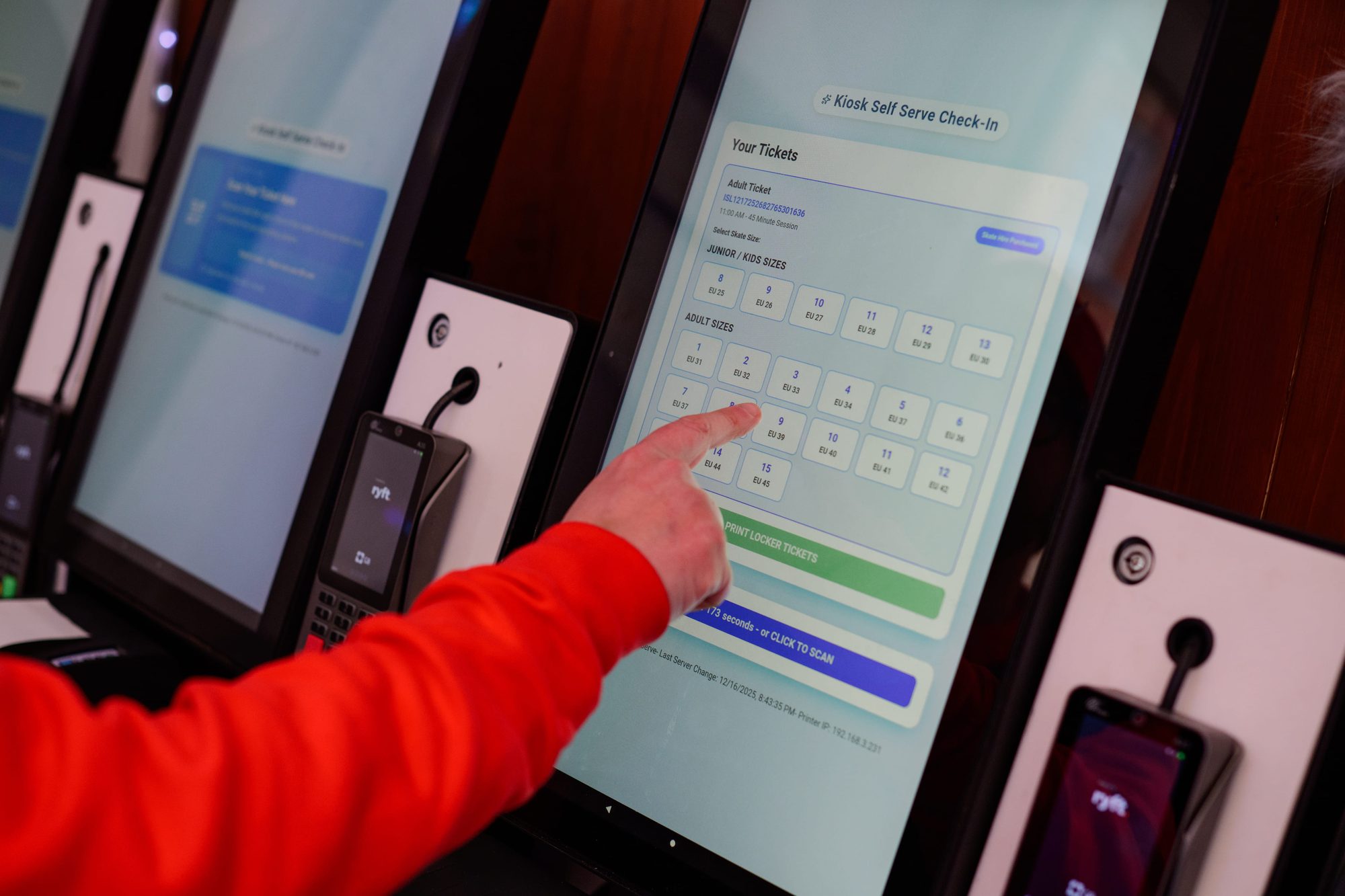
Self-serve check-in on a VenueOra kiosk: pick a skate size and get a locker
Why one platform
The scan at the door is a line on the same record
Scanning on its own tells you who turned up. Because VenueOra sells the ticket, scans it and takes payment on the kiosk, the check-in joins the guest's ticket, membership and order on one record, and the incident log sits beside it. The door and the dashboard read the same thing.
Sold and scanned in one place
The ticket is issued and checked by the same platform, so there is no export, import or sync between a ticket shop and a scanning tool, and live capacity on the event is the number actually sold.
Walk-ins sold at the kiosk
The self-serve kiosk sells walk-in tickets for the current event and takes Apple Pay, Google Pay and card-present payment, so a guest without a ticket buys one and scans in at the same screen.
Members known at the door
Member-only ticket types, guest day passes and policy acceptance all sit on the member record, so reception knows who the person at the door is and what they hold before they are let in.
Outcomes
What changes for your venue
01
No ticket used twice
Every scan marks the ticket used against the event, so a screenshot shared with a friend is rejected at the door, and the count of people inside is the count of tickets scanned.
02
Sold and scanned by one system
The platform that sold the ticket is the one that checks it, so there is no export to a scanning tool, no import of a guestlist, and a refund or reissue made at the desk is live at the door.
03
Door decisions on the record
Check-ins, refusals and incidents sit on the member and event records, so a pattern across several nights is visible to the manager rather than remembered by whoever was on the door.
FAQ
Questions venues ask
What does a ticket scanning app need to do at the door?
It needs to read the ticket, reject one that has already been used, and find the guest who has no ticket to hand. VenueOra scans the unique QR code on every ticket at the door and on a self-serve kiosk, rejects a used ticket, and gives reception a search by member, guest, order or ticket for everyone else. Venues that issue RFID wristbands scan those on the kiosk too, and refusals and incidents are logged from the same place.
What devices do staff scan with?
Scanning runs at the door in reception mode and on the kiosks you register against the venue. We do not publish supported device models on this page, so ask us in the demo rather than assume. Tell us how many doors you run, whether you want self-serve kiosks, and whether you issue RFID wristbands, and we will say what hardware fits your door.
Can guests check themselves in?
Yes, on a self-serve kiosk. The kiosk scans the QR code on the guest's ticket for the current event and checks them in; a ticket that has already been used is rejected. The same kiosk sells walk-in tickets, takes Apple Pay, Google Pay and card-present payments, and offers a member search with a second verification step. Face verification or enrolment and RFID wristband pairing run on the kiosk where the venue has that hardware.
Do Apple Wallet and Google Wallet tickets scan at the door?
Yes. Every ticket is delivered by email with a downloadable ticket carrying a unique QR code, and the guest can add it to Apple Wallet or Google Wallet. At the door, the guest opens the wallet pass and staff scan the code from the screen; the email ticket scans the same way for a guest who did not add the pass. Signed-in members also download tickets and add wallet passes from their account.
What happens when a guest has no ticket on them?
Reception mode finds them. It shows the current event and a guestlist search by member, guest, order or ticket, so staff look the guest up by name or by the order they placed and check them in. If the confirmation email went astray, staff can resend it or send an SMS from the order. A guest who was never on the list can be added to the guestlist, or sold a walk-in ticket at the kiosk.
Is ticket scanning sold separately?
No. Ticket scanning is part of the Events and Ticketing module alongside events, guestlists and check-in; self-serve kiosk check-in is part of the Kiosk and Payment Terminals module. Both are included in the Free and Venue plans when you turn them on from the Marketplace. Scanning reads the tickets VenueOra sold; if you only need scanning for tickets sold elsewhere, say so in the request and we will tell you plainly whether we fit.
Related
Industry
Festivals
ReadIndustry
Arenas and stadiums
ReadIndustry
Trampoline parks and FECs
Read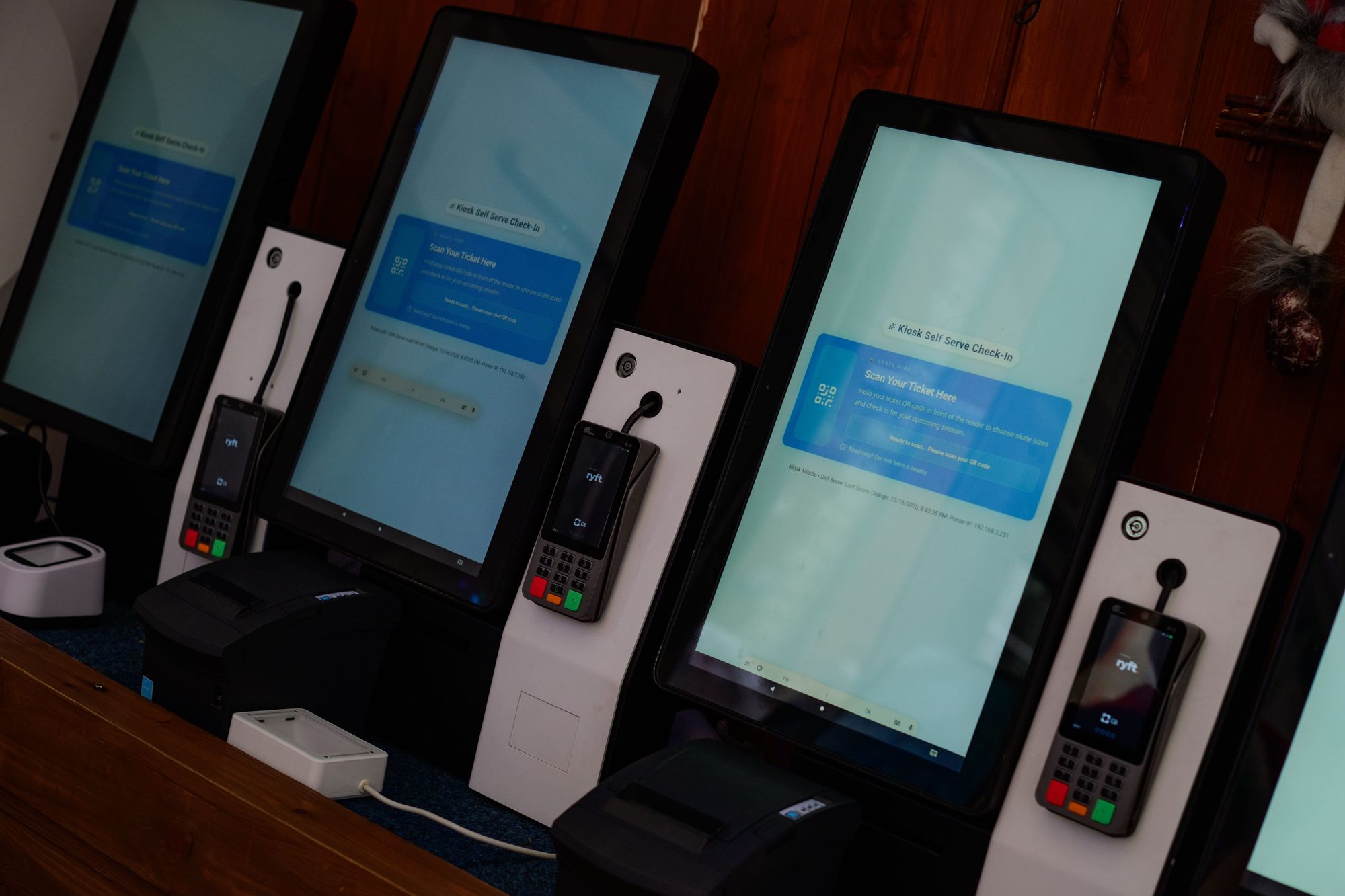
Guide
Cashless at festivals and arenas in 2026
How a cashless festival payment system works in 2026: open-loop contactless and Tap to Pay or RFID wristbands, top-ups, refunds, offline risk and one ledger.
ReadGuide
What is white label ticketing? A buyer's guide
What is white label ticketing? What vendors mean by it, from checkout colours to your own domain, sender address, fee model, customer data and wallet passes.
ReadSee VenueOra on your own venue
Tell us what your venue sells and we will walk you through the guest record, the gate and the till with your own numbers.