Memberships and passes
Season passes sold as membership plans, approved and renewed
VenueOra is season pass software for theme parks and annual pass software for zoos and attractions, built on the membership system that runs members' clubs. You price annual and monthly plans, your staff review applications, and renewal reminders go out when a plan falls due.
Step by step
How it works
- 1
Create plans and set prices
Set up annual and monthly subscription plans and price them yourself. An annual plan is the season pass or annual pass; a monthly plan is a gym or club membership. Each plan can gate ticket types.
- 2
Take applications and approve them
Guests apply on your branded site with a photo and, where you ask them, lifestyle and profile questions. Staff review each application, add internal comments, message the applicant from the request and approve or reject.
- 3
Collect payment and sign policies
A welcome email and a payment-request email go to the new member, who pays through their account. Outstanding policies are signed there before they continue, and acceptance is stored on the member record.
- 4
Remind, renew and win back
Renewal reminders go out as a plan falls due. The lifecycle manager sends due, lapsed and win-back emails, and member balances and outstanding payments show who still owes what.
What you get
Season pass software built on plans
A season pass or annual pass is an annual subscription plan priced by you, and a gym or club membership is a monthly one. Both sit on the member record with every ticket the member buys.
Applications with staff review
Single and couple applications with photos and lifestyle and profile questions. Staff review, approve or reject, leave internal comments, and message the applicant from a conversation timeline with quick-reply templates.
Renewal reminders and lifecycle emails
Renewal reminders go out as a plan falls due, and the lifecycle manager handles due, lapsed and win-back emails. Member balances and outstanding payments show who has paid and who has not.
Invite codes and guest day passes
Host and referral invite codes let the right people join without a full public application. Guest day passes admit a non-member to selected events, so a friend can come once without taking out a plan.
Member-only tickets and policies
Gate a ticket type to members, to a membership type or to a required plan, so only approved members can buy. Policies send automatically on application, approval or purchase, and acceptance is stored on the member.
Member account and staff roles
Members sign in by password or magic link, see outstanding payments, download tickets, add wallet passes and sign policies. Staff work as Owner, Admin, Manager, Staff, Accountant or Event Manager, each with its own permissions.
The dashboard
Members and plans on the same screen
The membership dashboard lists every member with plan, type, joined and expiry dates, and subscription management shows who is active, expiring or lapsed, with a lifecycle manager for the emails that follow.
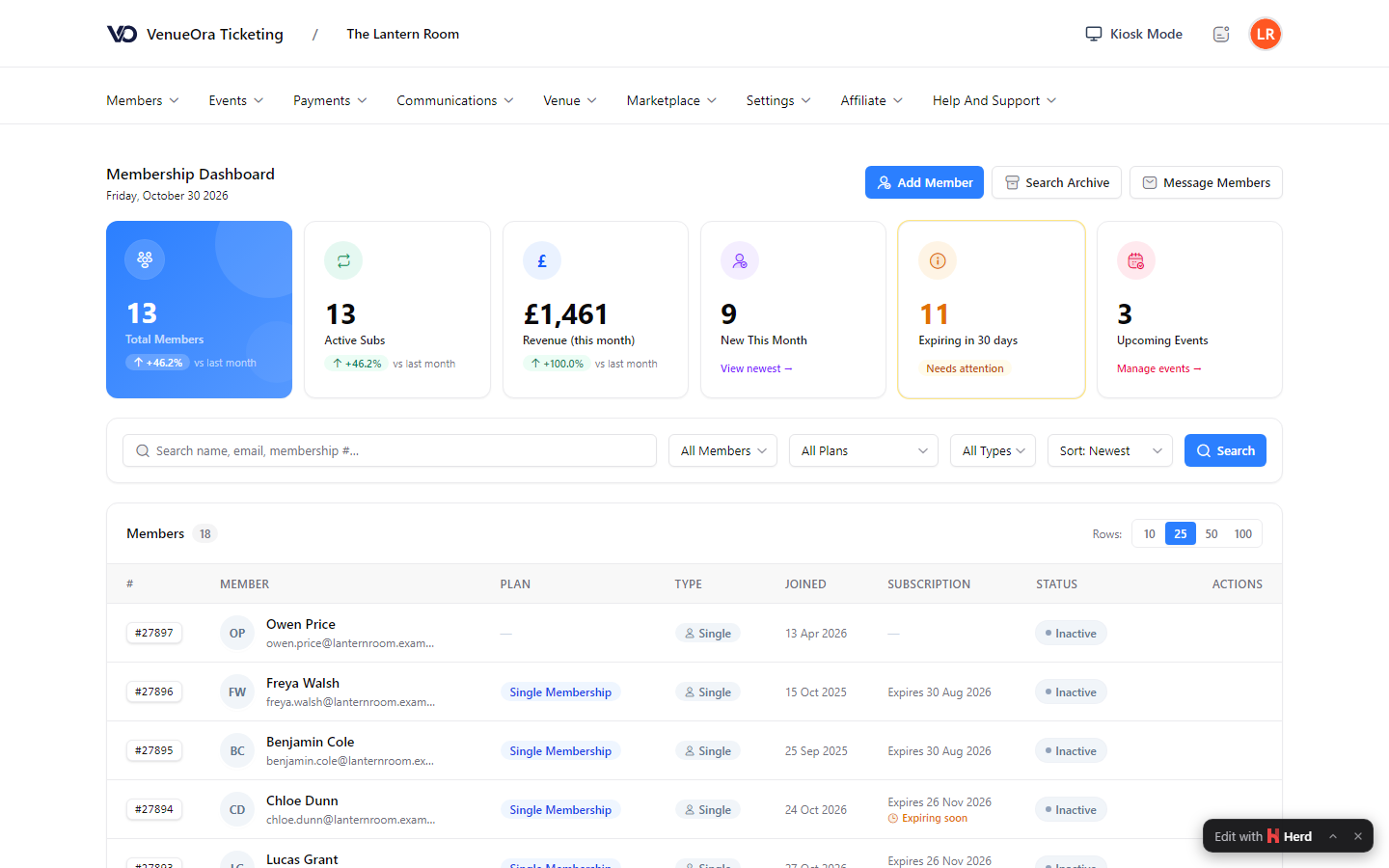
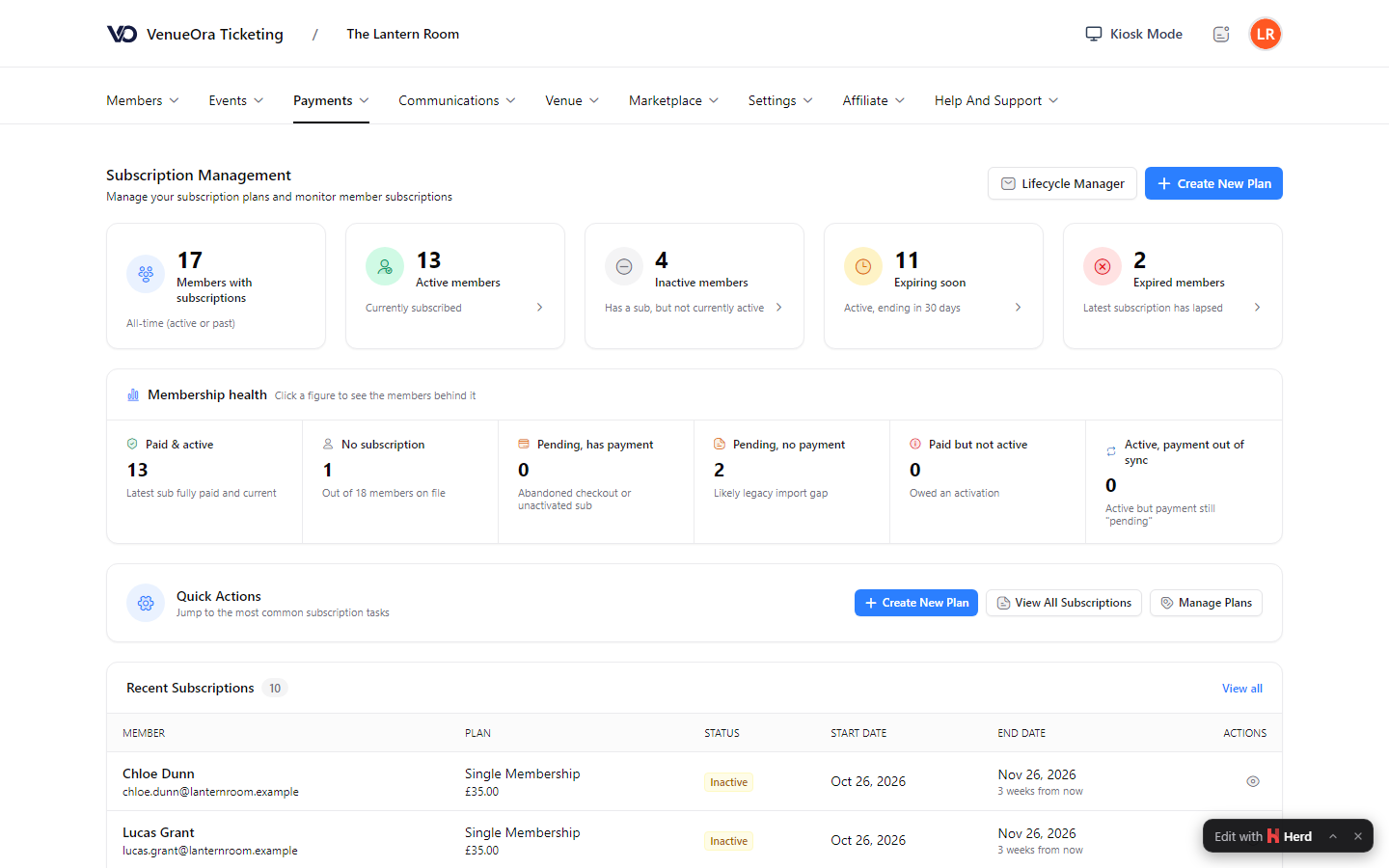
Screens show a live venue. Personal and venue details are blurred.
Why one platform
The pass, the ticket and the policy belong to one person
Membership software built for associations tracks who has paid. A venue needs to know what the member did with the pass: which events they bought tickets for, whether they signed the latest policy, whether they are in credit. VenueOra keeps all of it on one member record, because memberships, ticketing and payments run on one platform, and the Membership System is on for every venue.
Tickets on the member record
A member buys a ticket signed in, and it lands on their record next to their plan. Member-only ticket types and required plans read from that record at checkout.
Messages to the right members
Email campaigns go to audiences built from members, membership types, ticket buyers or saved segments, with merge tags and a preview against a real recipient. Push and Telegram reach members who do not open email.
Payments and payouts in view
Membership payments, ticket orders and refunds sit in the same payments list, and the payouts dashboard shows what is coming to your bank account once merchant verification is complete.
Outcomes
What changes for your venue
01
Renewals reminded, not chased
Renewal reminders and due, lapsed and win-back emails go out from the lifecycle manager, so a member of staff is not ringing round, and the balances list shows who still owes.
02
One record per member
A member's plan, application, policies, tickets, balance and check-ins sit on one record, so you know who holds a pass, what they have agreed to and whether they are paid up.
03
The right people, and only them
Staff review with photos, invite codes and member-only ticket types mean a members' night sells only to members, and a guest day pass covers the exceptions you choose to make.
FAQ
Questions venues ask
What should season pass software do beyond selling a pass?
It should price the pass as a plan you control, take the application, remind the holder when it falls due and know them at the door. VenueOra does each of these: annual and monthly subscription plans priced by the venue, applications with photos and staff review, renewal reminders and lifecycle emails for due, lapsed and win-back, member balances and outstanding payments, member-only ticket types, and a member account where the holder pays, downloads tickets and signs policies.
How do renewals work?
A plan is annual or monthly, and renewal reminders go out as it falls due. The lifecycle manager sends due, lapsed and win-back emails, so a member who has let a plan slip hears from you without a member of staff ringing round. Outstanding payments show in the member's account with success, pending, failed and expired states, and in your balances list. A member settles what is outstanding from their account, and the payment-request email can be resent.
Can I sell annual passes and season passes as well as monthly memberships?
Yes. An annual plan is the annual pass a zoo or museum sells and the season pass a theme park sells; a monthly plan is a gym, leisure centre or club membership. You price each plan yourself. Every plan sits on the same member record as the tickets the member buys, and a plan can be required before certain ticket types are offered. Single and couple applications cover two people who join together.
Does it work for a leisure centre or trust rather than a single attraction?
Yes, as membership software for a leisure operator. Monthly plans priced by the centre, renewal reminders and lifecycle emails, member balances and a member account with magic-link login fit a leisure centre membership, and staff roles separate the front desk from the accountant. Memberships, admissions and payments run on one platform with one record per member, and reports cover sales, VAT, year-on-year comparison and daily capacity for the board.
What reporting do I get on members?
The member list and profiles, member balances and outstanding payments, and the payments and payouts lists. Reports cover sales, VAT, year-on-year comparison and daily capacity, and the Accountant role covers payments, payouts, subscriptions and refunds. Guestlist analytics on each event show who came, and you can export orders when finance wants the raw data in a spreadsheet.
What does membership software cost?
The Membership System is included in both published plans. The Free plan has no monthly fee and charges £1.50 per ticket sold; the Venue plan is £150 a month and 80p per ticket sold. You set your own membership and ticket prices, and payouts follow merchant verification. Groups, multi-venue operators and high volumes are priced on request through the form on the pricing page.
Related
Industry
Zoos and aquariums
ReadIndustry
Leisure centres and trusts
ReadIndustry
Theme parks
ReadGuide
Season pass and annual pass software explained
What pass management software for attractions must do beyond single bookings: renewals, failed-payment retries, family pricing, wallet passes and forecasts.
ReadGuide
Loyalty programmes for attractions
How a loyalty programme for attractions and leisure centres differs from retail, the models that fit, tying it to the guest record and till, and measuring it.
ReadSee VenueOra on your own venue
Tell us what your venue sells and we will walk you through the guest record, the gate and the till with your own numbers.