Members' clubs
The member applies, is approved, signs the policy and books
VenueOra is members’ club management software for private clubs: applications reviewed by staff, annual and monthly plans, members-only and couples-only tickets, policies signed before entry and a bespoke brand site. Already live for private clubs.
A day at your venue
What happens, in order
- 01
Apply with a photo
A prospective member applies on the club’s site with photos and answers to the club’s lifestyle and profile questions, as a single or as a couple. The application lands in the dashboard for staff to review.
- 02
Staff review and reply
Staff see the photos and answers, add internal comments and message the applicant from the request with quick-reply templates. Every exchange sits on one timeline. On approval the welcome and payment-request emails go out.
- 03
Sign the policies
Outstanding policies such as house rules or a photography policy are sent automatically on approval and signed in the member’s account before they continue. Acceptance is stored against the member record.
- 04
Book a members’ night
Events carry ticket types that are members only, couples only or singles only, with a password where the club wants one. The ticket arrives by email and in Apple Wallet or Google Wallet with a QR code.
- 05
Arrive at reception
Reception mode shows the current event. Staff search by member, guest, order or ticket and check people in, or scan the QR code; a ticket already used is rejected. Guest day passes admit an invited non-member to selected events.
- 06
Renew without a form
The plan is annual or monthly at the club’s own price. Renewal reminders go out before the due date, and the lifecycle manager sends due, lapsed and win-back emails. Members pay outstanding balances in their account.
The stack
What the venue runs on
-
Applications, plans and renewals
Applications with photos, staff review, approve or reject, internal comments and a message timeline. Single and couple applications. Annual and monthly plans priced by the club, with renewal reminders and lifecycle emails for due, lapsed and win-back members.
-
02
TicketingMembers-only ticket types
Each event carries several ticket types with their own price and capacity. Rules per type: members only, couples or singles only, required or excluded plans, age restrictions and password-protected tickets. Scheduled publishing sets the moment tickets go live.
-
Reception mode at the door
The door uses the same records as online sales: the current event, guestlist search by member, guest, order or ticket, check-in and QR scan. A used ticket is rejected. Incidents and refusals are logged with member lookup.
-
ID checked before arrival
VenueGo, a verification platform designed for venues, checks a passport or driving licence on the applicant’s own phone before they arrive: face, then document, then a photo holding it. Results are approved, declined or needs review.
-
05
CompliancePolicies signed before entry
Policies are written in a rich-text editor with versions, sent automatically on application, approval or ticket purchase, and signed by the member in their account before they continue. Acceptance is stored on the member record.
-
Telegram groups and a bespoke site
Members join the club’s linked Telegram groups from their account; staff post event messages into a group and manage invites. The club’s public face is a white-label site or a bespoke brand site on the same engine.
The dashboard
Members and members-only events
The member list shows plan, type, joined and expiry for every member, and the events page shows member ticket types alongside public ones, each with its own capacity and sales.
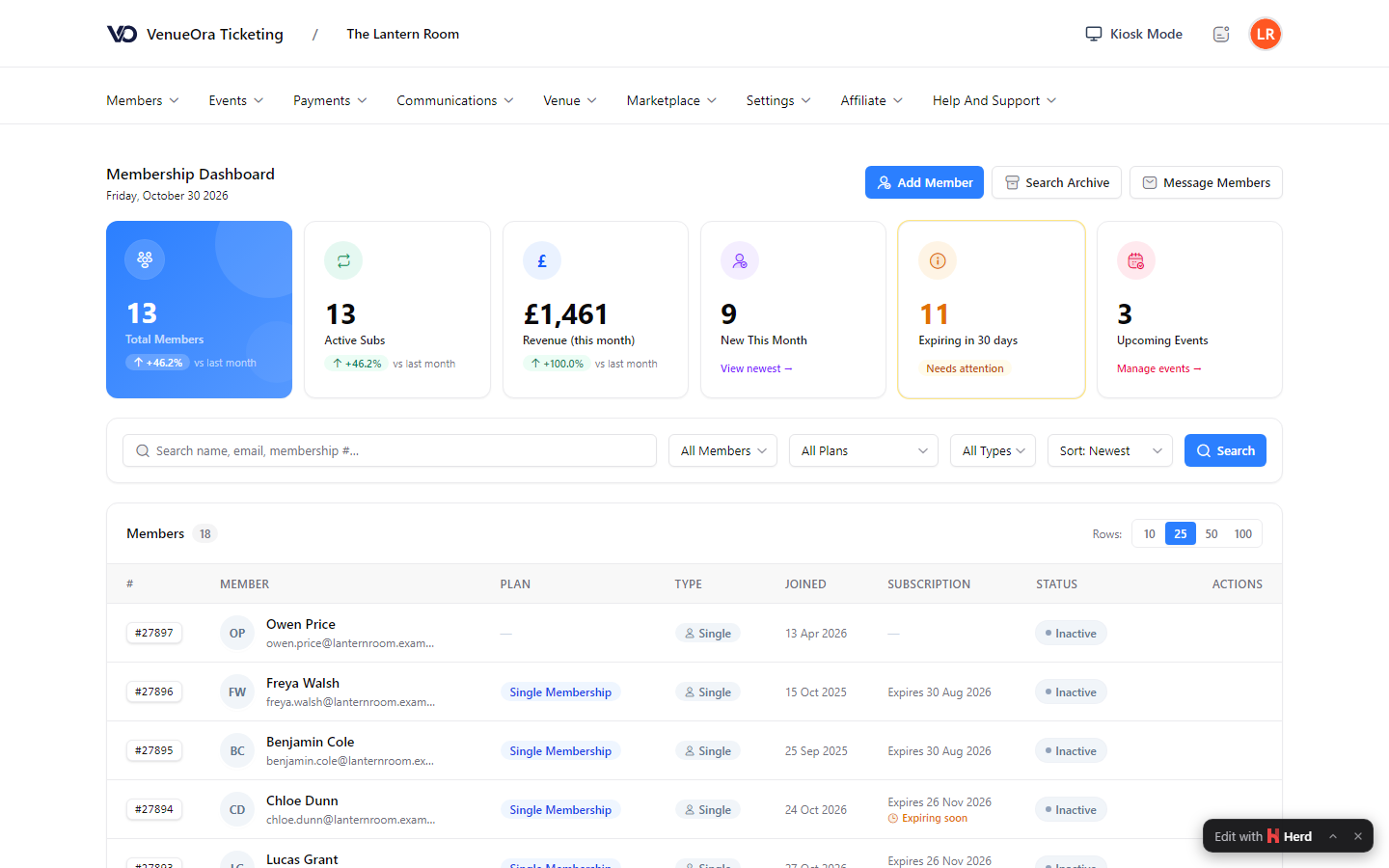
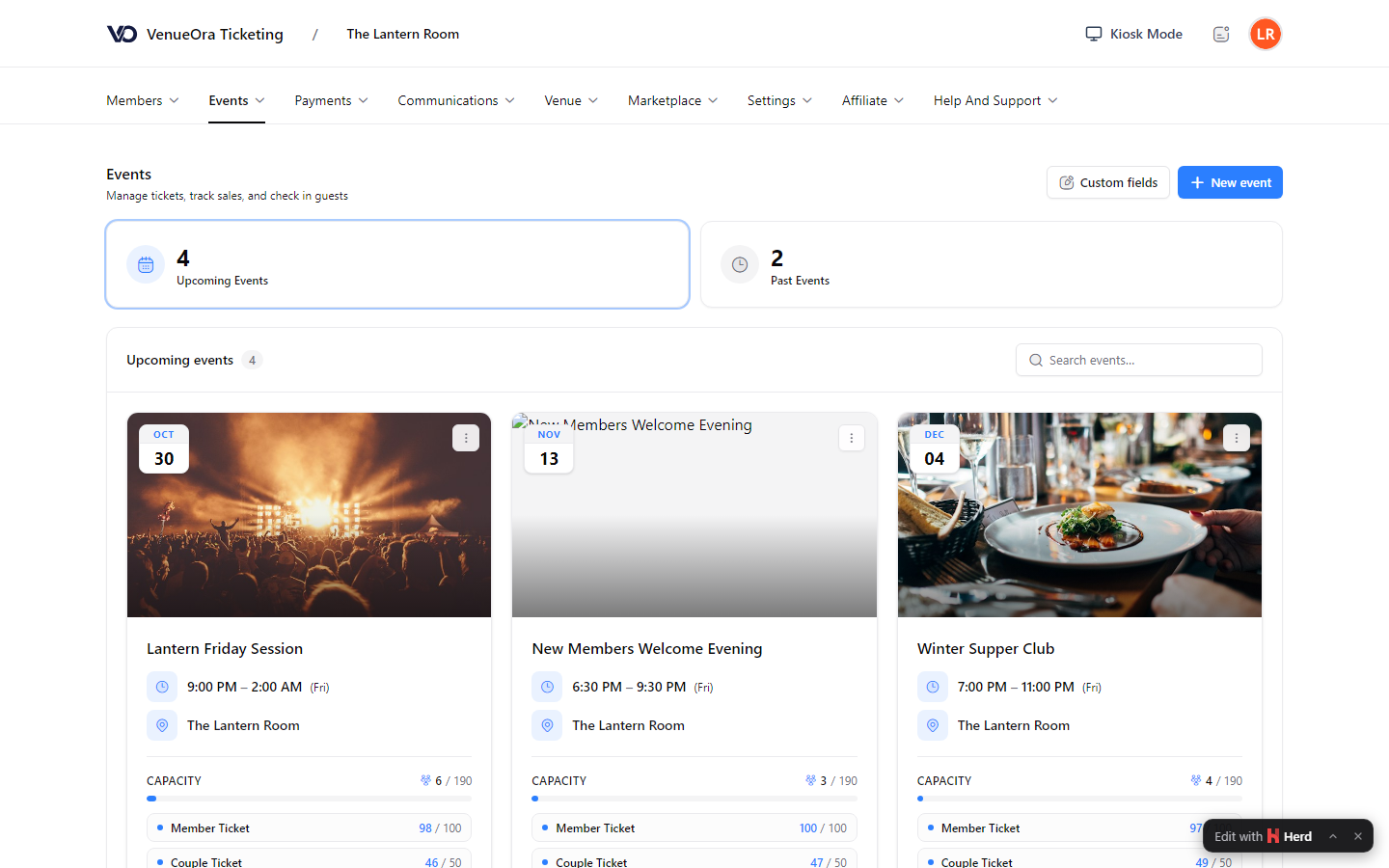
Screens show a live venue. Personal and venue details are blurred.
Outcomes
What changes for your venue
01
Applications you can review
Photos, lifestyle answers and the message history sit on each request. Staff approve, reject or ask a question from one screen, and a couple’s application is reviewed as one record rather than two.
02
Members’ nights for members
Members-only, couples-only and password-protected ticket types mean the people in the room are the people the club approved. Guest day passes cover an invited friend for selected events without a membership.
03
Renewals without the secretary
Annual and monthly plans carry renewal reminders and lifecycle emails for due, lapsed and win-back members. Outstanding balances show in the member’s account and in the dashboard, so nobody chases cheques.
Why one platform
The committee sees one member, not three systems
Clubs often hold the membership list in one place, event tickets in another and the door on a clipboard. VenueOra puts the application, the plan, the tickets, the policies and the check-in on one member record, already live for private clubs.
Invite codes and guest passes
Host and referral invite codes let the right people join without a full public application. Guest day passes admit a non-member to selected events, and that record stays separate from a full membership.
What the check does not do
VenueGo reads the document in the camera. It does not look up DVLA, the passport office, or any other government database, and it does not read a passport chip. A clear result is not proof a document is genuine. It does not replace a premises licence, a challenge at the bar, or legal advice.
Bar tills from Posso UK
Where the club runs a bar or dining room, Posso UK, our hardware and installation partner, supplies, installs, trains and supports the ePOS tills and card machines. VenueOra provides payment processing on the Posso platform.
UK-based and private
VenueOra is a UK company with UK-based support. Membership and ticketing data is UK-based, VenueGo images are deleted after 30 days unless a review is open, and card data never touches your tills, kiosks or lockers.
FAQ
Questions venues ask
How does the membership application process work on VenueOra?
The applicant fills in the club’s application on its site with photos and the club’s lifestyle and profile questions, alone or as a couple. Staff review it in the dashboard, add internal comments and message the applicant from the request using quick-reply templates with the applicant’s name, partner and plan filled in. On approval the welcome and payment-request emails go out, and any policy set to send on approval follows. Invite codes let referred people skip the public application.
Can we restrict events to members, or to couples only?
Yes, each ticket type carries its own rules: visible to everyone or members only, couples only or singles only, required or excluded membership plans, age, gender and profile-type restrictions, and an optional password. An event can mix a members-only ticket with a guest day pass for selected nights. Capacity and sales are live on the event, and scheduled publishing fixes the moment tickets go on sale.
Who supplies and supports the bar and dining tills?
Posso UK, our hardware and installation partner, supplies, installs, trains and supports the ePOS tills, kitchen display systems, table ordering and card machines, and offers table booking through TableMaestro. VenueOra provides the payment processing on the Posso platform. The tills are a separate system from the membership record; VenueOra’s own reports cover ticket sales, VAT, year-on-year comparison and daily capacity.
What does the age check at sign-up verify?
It checks that the face, the document and the applicant match on camera, and returns approved, declined or needs review. VenueGo reads the document in the camera. It does not look up DVLA, the passport office, or any other government database, and it does not read a passport chip. A clear result is not proof a document is genuine. It does not replace a premises licence, a challenge at the bar, or legal advice.
Is VenueOra members club management software suitable for a small club?
Yes. The Free plan has no monthly fee and charges £1.50 per ticket sold; the Venue plan is £150 a month and 80p per ticket sold. Both include the Membership System and every module the club turns on, and the club sets its own membership and ticket prices. VenueGo has its own plans: £0 for 25 checks, £9 a month for 500 checks and £29 a month for 2,500 checks. Support is UK-based.
Do members have to sign house rules before they can book?
Yes, where the club sets it up that way. Policies are written in a rich-text editor and kept in versions. A policy can be sent automatically when someone applies, when they are approved or when they buy a ticket, with a delay if wanted, and limited to certain membership types or events. Members sign outstanding policies in their account before they continue, and acceptance is stored against the member.
Related
Guide
Season pass and annual pass software explained
What pass management software for attractions must do beyond single bookings: renewals, failed-payment retries, family pricing, wallet passes and forecasts.
ReadGuide
Digital proof of age for alcohol sales in 2026
The 2026 change letting England and Wales premises accept digital proof of age for alcohol sales, what the DVS register requires and what a venue can do now.
ReadSee VenueOra on your own venue
Tell us what your venue sells and we will walk you through the guest record, the gate and the till with your own numbers.